Open NPS Account Online Instantly
Published: 28 Aug 2026
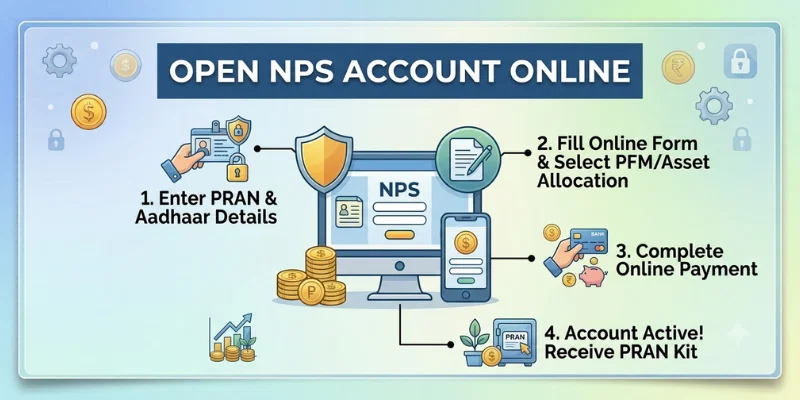
You can Open NPS Account Online without visiting a bank or service centre. The process usually includes digital KYC, document upload, pension fund selection, initial contribution, and online verification. After successful registration, you receive a Permanent Retirement Account Number, also called PRAN. This account helps you invest regularly for retirement. The online method can save time and make account management easier.
1. What Is an NPS Account?
An NPS account is a retirement-focused investment account under the National Pension System. It allows you to contribute money regularly and build a retirement fund over time. Your money is invested in options such as equity, corporate debt, and government securities. For example, Ali may invest ₹5,000 every month in his Tier I account. His savings may grow according to market performance, contribution amount, and investment period. After successful registration, he receives a Permanent Retirement Account Number, or PRAN. People can Open NPS Account Online and manage contributions, nominee details, and investment choices digitally.
2. Can You Open NPS Account Online?
Yes, eligible applicants can Open NPS Account Online through the eNPS portal of their chosen Central Recordkeeping Agency, or CRA. The online process allows you to complete registration from home without visiting a bank or service centre.
1. Complete Digital Registration
You can enter your personal, contact, address, and bank details online. The registration form can be submitted digitally along with the required documents. This makes the process quicker and more convenient.
2. Complete Online KYC
Applicants can complete KYC through an approved method, such as Aadhaar-based verification or another option offered by the portal. Your name, date of birth, PAN, and address details should match your official records. Incorrect information may delay account opening.
3. Choose Your Account and Investments
During registration, you can select the account type, pension fund manager, investment choice, and asset allocation. You can also add nominee information. Review every option carefully before submitting the form.
4. Make the Initial Contribution
You must make the required opening contribution using an available online payment method. The registration remains incomplete if the payment fails. Keep the payment receipt and acknowledgement number for your records.
5. Receive Your PRAN
After successful registration and verification, you receive a Permanent Retirement Account Number, or PRAN. This number is used to access, contribute to, and manage your NPS account. You can later log in through the portal of the CRA that issued your PRAN.
3. Who Is Eligible to Open an NPS Account?
The eligibility to Open NPS Account Online depends on age, citizenship, residency status, and KYC compliance. Under the current All Citizen Model rules, eligible Indian citizens and Overseas Citizens of India can join NPS if they meet the required conditions.
1. Resident Indian Citizens
Resident Indian citizens can open an individual NPS account. They must complete the required KYC process and submit valid identity, address, and bank details. Salaried and self-employed people can both apply.
2. Non-Resident Indians
Eligible Non-Resident Indians can also open an NPS account. They may need passport, overseas address, Indian bank account, and other KYC documents. Additional banking and withdrawal conditions may apply to NRI subscribers.
3. Overseas Citizens of India
Eligible OCI applicants can join the National Pension System under current rules. They must meet the required age, KYC, banking, and documentation conditions. The application should be submitted under the correct residency category.
4. Age Requirement
Applicants under the All Citizen Model should currently be between 18 and 85 years old on the application date. People below 18 may be covered separately under NPS Vatsalya rather than a regular individual account.
5. Salaried Employees
Private-sector employees can open an individual account or join through an employer offering corporate NPS. Eligible government employees may participate under the rules that apply to their service category. Employer contributions may also be available in some cases.
6. Self-Employed People
Freelancers, professionals, shop owners, and business owners can open an NPS account. They can choose their own contribution amount, pension fund manager, and investment option. Regular contributions can help them build retirement savings without an employer pension.
7. KYC Requirement
Every applicant must follow the prescribed Know Your Customer rules. Personal details should match records such as PAN, Aadhaar, bank documents, and address proof. Incorrect or mismatched information may delay online registration.
8. Who Is Not Eligible?
Hindu Undivided Families and Persons of Indian Origin are not eligible to subscribe under the regular All Citizen Model. Applicants should also not open another NPS account if they already have an active PRAN.
4. Documents Required to Open NPS Account Online
Before you Open NPS Account Online, keep clear digital copies of all required documents ready. Correct and matching details can make KYC, bank verification, and registration much easier.
1. Recent Photograph
You need a clear and recent passport-size photograph. The image should meet the file size and format accepted by the registration portal. Avoid uploading a blurry or old photograph.
2. PAN Card
A valid PAN card is required for NPS registration. Your name, date of birth, and other details should match your KYC and bank records. Any mismatch may delay verification.
3. Proof of Address
Resident applicants must provide an accepted address document. Depending on the portal, this may include Aadhaar, passport, voter ID, driving licence, or another approved proof. Check the subscriber form for the complete list.
4. Bank Account Proof
Keep proof of your bank account ready, such as a cancelled cheque, bank statement, passbook, or bank certificate. It should clearly show your name, account number, and IFSC. Correct bank details are important for withdrawals and account verification.
5. Signature
You may need to upload a scanned image of your signature. Use a clear signature on a plain background and follow the required file format. The signature should match the one used in your official records where applicable.
6. Mobile Number and Email Address
Use an active mobile number and email address during registration. OTPs, payment updates, PRAN details, and account notifications may be sent to them. Check both details carefully before submitting the form.
7. Documents for NRIs
NRI applicants generally need a recent photograph, PAN card, Indian passport, proof of an Indian address, and proof of an NRE or NRO bank account. Additional residency or KYC documents may also be requested by the chosen portal.
8. Documents for OCI Applicants
OCI applicants generally need a recent photograph, PAN card, OCI card, proof of a foreign address, and proof of an NRE or NRO bank account. They should select the correct applicant category during registration.
5. Step-by-Step Process to Open NPS Account Online
You can Open NPS Account Online by following a few simple steps. Keep your documents, bank details, mobile number, and payment method ready before starting.
1. Visit the Official Portal
Open an approved eNPS or CRA registration website.
2. Select New Registration
Choose the option to open a new individual NPS account.
3. Enter Personal Details
Fill in your name, date of birth, PAN, mobile number, email, and address.
4. Complete KYC
Verify your identity through Aadhaar, PAN, DigiLocker, or another available method.
5. Choose the Account Type
Select Tier I only or Tier I with Tier II.
6. Select Investment Options
Choose your pension fund manager, Active or Auto Choice, and asset allocation.
7. Add Nominee Details
Enter the nominee’s name, relationship, and other required information.
8. Upload Documents
Upload your photograph, signature, address proof, and bank proof.
9. Make the Initial Contribution
Pay the required opening amount through an available online payment method.
10. Complete eSign or OTP Verification
Authenticate the application using the available digital method.
11. Receive Your PRAN
After successful registration, you will receive your Permanent Retirement Account Number.
6. Common Problems While Opening an NPS Account Online
Applicants may face a few technical or document-related issues during registration. These common problems can delay the process:
- PAN and Aadhaar details do not match.
- OTP is not received on the registered mobile number.
- Uploaded documents are blurry or unclear.
- File size or format is not accepted.
- Bank account details are entered incorrectly.
- Initial contribution payment fails.
- eSign or online authentication does not work.
- Nominee information is incomplete or incorrect.
- The application remains pending after payment.
- PRAN is not generated because registration is incomplete.
Yes, eligible applicants can complete the process online through an approved NPS or CRA portal. KYC, document upload, payment, and authentication can usually be completed digitally. The exact steps may depend on the selected platform.
The process may be completed quickly when your KYC, documents, and payment are successful. Delays can happen because of mismatched details or failed verification. Keep your acknowledgement number to track a pending application.
No, Tier II requires an active Tier I account. You can choose Tier I only or apply for both during registration. Tier I remains the main retirement account.
Do not immediately create another registration request. Save the acknowledgement number and use the payment retry option available on the portal. Also check whether the amount was deducted from your bank account.
Subscribers may change their pension fund or investment choice under applicable NPS rules. Compare long-term performance and risk before switching. Avoid making changes only because of short-term returns.
PRAN may not be generated if KYC, payment, or authentication remains incomplete. Check your application status using the acknowledgement details. Contact the selected CRA or service provider if the problem continues.
Online registration is safer when you use an official PFRDA, NPS Trust, CRA, or authorised provider portal. Never share your OTP, password, or personal login details. Check the website address carefully before entering financial information.
Conclusion
So guys, in this article, we’ve covered Open NPS Account Online in detail. We discussed eligibility, required documents, the registration process, account choices, KYC, payment, PRAN generation, and common problems. In my opinion, beginners should keep all documents ready and use only an official NPS or CRA portal. Review every detail carefully before submitting the application. Start your online NPS registration today and take the first step toward retirement planning.
The information and calculators on Finance Calculatorz are provided for educational purposes only. Calculator results are estimates and may not always be fully accurate. This content is not financial, investment, tax, or legal advice. Please consult a qualified professional before making any financial decision.



- Be Respectful
- Stay Relevant
- Stay Positive
- True Feedback
- Encourage Discussion
- Avoid Spamming
- No Fake News
- Don't Copy-Paste
- No Personal Attacks
- Be Respectful
- Stay Relevant
- Stay Positive
- True Feedback
- Encourage Discussion
- Avoid Spamming
- No Fake News
- Don't Copy-Paste
- No Personal Attacks
